Recommended
Stellar Blade Complete Edition | RePack | v1.4.1
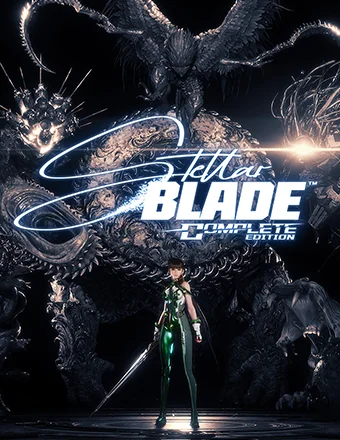
Stellar Blade Complete Edition | RePack | v1.4.1

/ Views:  90 077 / Comments: 1

Release Date: 2025

Genre: Action, Adventure, RPG

Developer: SHIFT UP Corporation

Publisher: PlayStation Publishing LLC

Game version: v1.4.1

Release type: RePack

Interface language: English, Russian, Multi

Audio language: English, Multi

Мedicine: Included (Hypervisor Bypass)


System requirements


Operation system: Windows 10 64-bit

Processor: Intel® Core™ i5-7600k Processor / AMD Ryzen™ 5 1600X Processor

Memory: 16 GB

Graphics: NVIDIA GeForce GTX 1060 6GB or AMD Radeon RX 580 8GB

Free hard disk space: 60.27 GB


About This Game


The future of humanity teeters on a knife's edge. Earth has been overrun by strange and powerful creatures, leaving it abandoned. The remnants of the human race have escaped to a space Colony. From this Colony, EVE embarks on a journey back to the desolate remains of our planet with a clear mission: to save humanity by reclaiming Earth from the Naytiba, the malevolent force responsible for its devastation. Yet, as EVE confronts the Naytiba and uncovers the mysteries of the past among the ruins of human civilization, she discovers her mission is anything but simple. In fact, nothing is quite as it appears. Engage in lightning-fast combat as you carve your way through Earth's remnants. Execute graceful yet fierce attacking combos, unlock new moves and weapon upgrades, and face epic boss battles that demand both wit and strength. Immerse yourself in a richly detailed post-apocalyptic world that masterfully blends beauty with horror. Unravel a gripping story of human fate, featuring mature themes, a thought-provoking narrative, and emotionally charged revelations from start to finish.


Screenshots Trailer Release Features DLCs


  • Nothing is cut / nothing is recoded;
  • Installation time depends on the computer's power;
  • Language selection in the game settings, during installation, or in the *.ini file in the game folder.
  • -
Comments 1
Admin
4
Admin2 March 2026 00:57

///////////////////ENGLISH//////////////////////////////

1. Disable your antivirus and Windows Defender, add the game folder to the exclusions
2. All files are already in the game folder. A backup copy is in the _bypass.zip archive in the game folder, in case the antivirus has deleted them
3. Prepare the system to launch games using a hypervisor:
- Reboot and enter the BIOS. Disable Secure Boot and enable virtualization (VT-x on Intel, SVM or AMD-V on AMD).
- Boot into the operating system.
- Run Command Prompt as Administrator and enter: bcdedit /set testsigning on (After rebooting, you will see a “Test Mode” message in the bottom-right corner of the desktop — this is normal.)
- Run Command Prompt as Administrator again and enter: bcdedit /set hypervisorlaunchtype off
- Reboot.
- At this point, the system preparation for launching games using this type of bypass is complete (this only needs to be done once).
4. Open the Command Prompt as an administrator and enter the command: sc create denuvo type=kernel start=demand binPath=D:\Stellar Blade\SB\Binaries\Win64\driver_amd\SimpleSvm.sys  (Just make sure to specify your own path to the SimpleSvm.sys file for AMD. For Intel, use: sc create denuvo type=kernel start=demand binPath=D:\Stellar Blade\SB\Binaries\Win64\driver_intel\SimpleSvm.sys. These files are located in the driver_amd and driver_intel folders respectively.)
5. In the same Command Prompt window, enter: sc start denuvo (After finishing the game, you can stop the service by entering: sc stop denuvo.)
6. Launch the game using SB-Win64-Shipping.exe located in game folder.

If the game still doesn’t start after preparing the system, the following may help:
- Open the command prompt as an administrator and enter the command bcdedit.exe /set nointegritychecks on
- Disable NX Mode in the BIOS (if your BIOS has this option)

///////////////////РУССКИЙ//////////////////////////////

1. Отключите антивирус и Windows Defender, добавьте папку игры в исключения
2. Все файлы уже в папке игры, резервная копия в архиве _bypass.zip в папке игры, на случай если антивирус удалил
3. Подготавливаем систему к запуску игр с использованием гипервизора:
- Перезагружаемся и заходим в Bios, выключаем Secure Boot, а так же включаем виртуализацию (VT-x на Intel, SVM или AMD-V на AMD)
- Грузимся в систему
- Запускаем командную строку от имени администратора, вводим команду bcdedit /set testsigning on (после перезагрузки справа внизу на раб. столе появится надпись "тестовая версия" или как-то так, это нормально)
- Запускаем командную строку от имени администратора, вводим команду bcdedit /set hypervisorlaunchtype off
- Перезагружаемся
- На этом, в целом, подготовка системы к запуску игр с подобным обходом закончена (она делается разово)
4. Запускаем командную строку от имени администратора, вводим команду sc create denuvo type=kernel start=demand binPath=D:\Stellar Blade\SB\Binaries\Win64\driver_amd\SimpleSvm.sys (только указывайте ваш путь до файла SimpleSvm.sys (для AMD) или же sc create denuvo type=kernel start=demand binPath=D:\Stellar Blade\SB\Binaries\Win64\driver_intel (для INTEL), данные файлы будут лежать в папках driver_amd и driver_intel соответственно)
5. В той же командной строке вводим команду sc start denuvo (после окончания игры можете ввести в командной строке команду sc stop denuvo чтобы остановить сервис)
6. Запускаем игру с файла SB-Win64-Shipping.exe в главной директории игры

Если у вас после подготовки системы игра всё равно не запускается, то может помочь следующее:
- Запускаем командную строку от имени администратора, вводим команду bcdedit.exe /set nointegritychecks on
- Выключаем в Bios NX Mode (если у вас таковой пункт имеется)

Information

The ability to comment on this publication has been disabled.